How to show Hidden files and folders in Windows 7. Method also works in Windows XP and Vista.
Method 1
Show hidden files and folders using Folder Options.


Method 1
Show hidden files and folders using Folder Options.
- Click on Start Button. Type "Folder options" and open it. Or you can open windows explorer and click on organize (top left) and click folder options.
- A folder options window opens.
- Click on the view tab.
- Change from "Don't show hidden files" to "Show hidden files".
- Click on Apply and OK.
Method 2
Show hidden files and folders using Registry editor.
- Open registry editor by clicking Start Button and type "regedit".
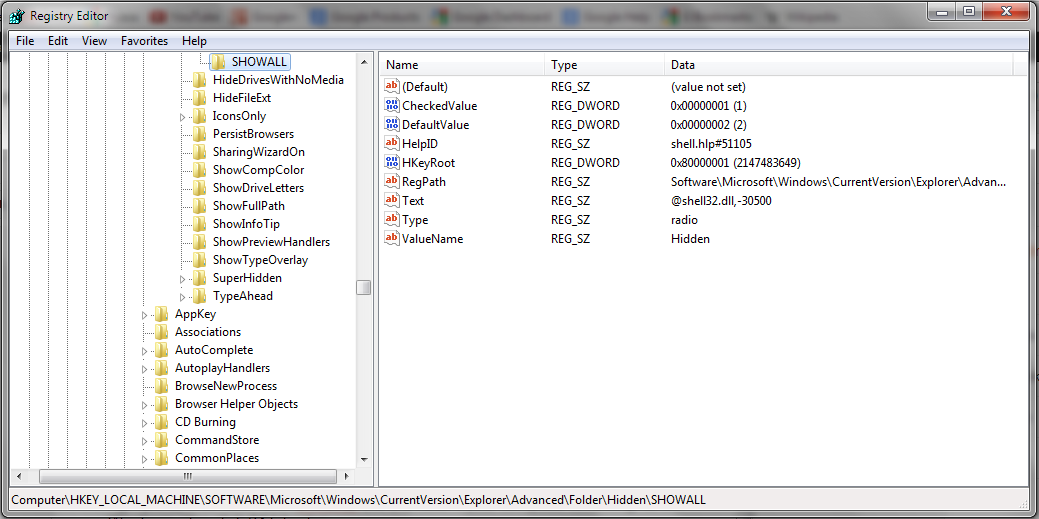
- Locate the following registry:Computer\HKEY_LOCAL_MACHINE\Software\Microsoft\Windows\CurrentVersion\Explorer\Advanced\Folder\Hidden\SHOWALL
- Click SHOWALL folder in the left pane and check if item CheckedValue is present in the right pane and if the value set to it is 1.
- If CheckedValue item is missing in the right pane, then right click in the blank area on the right pane, click New -click DWORD (32 bit) value if your computer is running 32 bit Windows, else click 64 bit value.
- Name the item you created as CheckedValue.
- Double click on CheckedValue item and type 1 in the value data box and then click ok.
- Close the registry editor and restart the computer.
- Enable hidden files and folders to see if it works.
[Click to view full size]